
Introduction
The print studio wants the same postcard in a new direction and at a larger pixel size. You will trace where one pixel moves, implement clockwise rotation, then add integer enlargement without blending colors.
This lab starts independently with its own artwork and source files. You need the grid, palette, P3 and terminal skills taught in the preceding lab. A small supplied command-line reader handles option parsing; you implement the coordinate functions. Keep the supplied artwork and option reader unchanged. Practice time is an author estimate.
Rotate a Rectangular Postcard Clockwise
In this step, you will turn a five-by-three image into a three-by-five image without changing its colors.
Open Workspace. This lab has its own freshly prepared /home/labex/project/postcards; it does not use files from the previous lab. base.c is the complete original-orientation example. First compile and run that normal example:
cd /home/labex/project/postcards
gcc -std=c11 -Wall -Wextra base.c -o base
./base > original.ppm
Switch to Postcard Preview, click Refresh files, choose original.ppm, then Open postcard. Its 5 × 3 status and colored rows establish the starting orientation. Return to Workspace and read the new framework:
cat art.h
cat card.c
Keep art.h, base.c, and cli.h unchanged; edit card.c. The supplied main accepts two arguments: ROTATE is exactly 0 (original) or 1 (clockwise), and SCALE is an integer from 1 through 4. The support in cli.h stores them in the integer variables rotation and scale. parse_options returns true only for supported arguments; otherwise main returns status 2 before writing an image. The argc and argv declarations belong to that supplied C entry point; you do not need to implement pointer-based parsing here.
A clockwise turn exchanges width and height. Use (x,y) for column and row, with zero at the top left. First predict where the corners go in the five-by-three rectangle:
| Source position | Clockwise destination |
|---|---|
(0,0) top left |
(2,0) top right |
(4,0) top right |
(2,4) bottom right |
(0,2) bottom left |
(0,0) top left |
(4,2) bottom right |
(0,4) bottom left |
The program visits destination pixels and asks which source to read. Work backward from the destination top left: it needs source (0,2). As destination y increases, the source column increases; as destination x increases, the source row decreases. Therefore the source column is y and the source row is HEIGHT - 1 - x. Subtract the destination column from the last source-row index to reverse the rows. WIDTH - 1 would start at row 4, outside this three-row artwork.
Each coordinate function receives x and y as integer parameters and returns one integer index. When rotation is zero, keep the column x and row y. The provided rotation ? HEIGHT : WIDTH expression means “choose HEIGHT if rotation is nonzero, otherwise WIDTH.” The supplied main already sets the output dimensions and calls both functions for every pixel; leave it unchanged.
Edit the existing skeleton with the nano method from the first lab:
nano card.c
Press Ctrl+W, search for int source_x, and press Enter. Use the arrow keys to enter its braces. Remove the TODO comment, (void)x;, (void)y; and placeholder return 0; from this function only. The (void) lines merely suppress warnings while a parameter is unused. Replace that body with a branch: when rotation is nonzero return y; otherwise return x. Keep the function declaration and its enclosing braces.
Find int source_y the same way. Use the reversed-row expression you derived for the turned case, and return y for the unturned case. Compare your two edited functions with this first-stage reference:
int source_x(int x, int y) {
    if (rotation) return y;
    return x;
}
int source_y(int x, int y) {
    if (rotation) return HEIGHT - 1 - x;
    return y;
}
This stage handles scale 1. Save with Ctrl+O, Enter, then exit with Ctrl+X. Before compiling, read back the functions and confirm that the header includes and main remain unchanged. A wrong-file edit can be abandoned with Ctrl+X then N before saving. A saved typo is repaired by reopening that function, not by reinitializing the workspace.
cat card.c
Compile it. Run original orientation and clockwise rotation with scale 1; each output gets a distinct name:
gcc -std=c11 -Wall -Wextra card.c -o card
./card 0 1 > original.ppm
./card 1 1 > rotated.ppm
Inspect the rotated file:
python3 /home/labex/.local/share/pixel-postcards/inspect.py rotated.ppm
3 x 5 pixels; 15 RGB triples; max value 255
Switch to Postcard Preview, click Refresh files, select rotated.ppm, and click Open postcard. The old left dark strip should now be the top dark row. Dimensions alone do not prove rotation: compare the colored pixels too. If the result looks mirrored, revisit the HEIGHT - 1 - x reversal, then compile and generate the file again.
Enlarge Each Pixel and Reject Invalid Options
In this step, you will enlarge the rotated card by copying each source pixel into an equal-sized block.
Start in Workspace. For scale 2, destination columns 0 and 1 both read column 0; columns 2 and 3 both read column 1. Integer division gives exactly that grouping: 0 / 2 and 1 / 2 both produce 0. Dividing destination coordinates by scale first reverses enlargement. Then the same reverse-rotation formula chooses the source location. This produces a clockwise-rotated image enlarged by a positive integer, with no mixed or interpolated colors.
Before editing, group the destination coordinates yourself: at scale 2, columns 0 and 1 map to group 0, columns 2 and 3 to group 1, and columns 4 and 5 to group 2. The same rule applies to rows. A destination pixel (4,6) in the enlarged clockwise image first becomes (2,3) in the unscaled clockwise image; reversing the turn then reads source (3,0). Which neighboring destination pixel reads that same source?
The output dimensions in main already multiply by scale. Only the two mapping functions need to change. Reopen them:
nano card.c
Use Ctrl+W to find int source_x. Divide the destination coordinate by scale in each return: the turned case uses the destination row; the unturned case uses the destination column. In source_y, reverse the grouped destination column from HEIGHT - 1 for the turned case, and use the grouped destination row for the unturned case. C performs integer division before subtraction, so the row expression groups x before subtracting it. Subtracting first and then dividing would use the wrong coordinate space.
After deriving and editing those four returns, compare the two functions with this reference. Leave their callers, P3 header, output loops, parser and supplied files intact:
int source_x(int x, int y) {
    if (rotation) return y / scale;
    return x / scale;
}
int source_y(int x, int y) {
    if (rotation) return HEIGHT - 1 - x / scale;
    return y / scale;
}
Save with Ctrl+O, Enter, and exit with Ctrl+X. If GCC reports a syntax error, reopen card.c, find the named function and use its line number to locate the typo. Check the semicolons, parentheses and braces you edited; save and compile successfully before generating new files. The old executable and PPM files do not change just because source has changed.
Compile, refresh the original and rotated outputs from this executable, and create the rotated two-times enlargement:
gcc -std=c11 -Wall -Wextra card.c -o card
./card 0 1 > original.ppm
./card 1 1 > rotated.ppm
./card 1 2 > enlarged.ppm
python3 /home/labex/.local/share/pixel-postcards/inspect.py enlarged.ppm
6 x 10 pixels; 60 RGB triples; max value 255
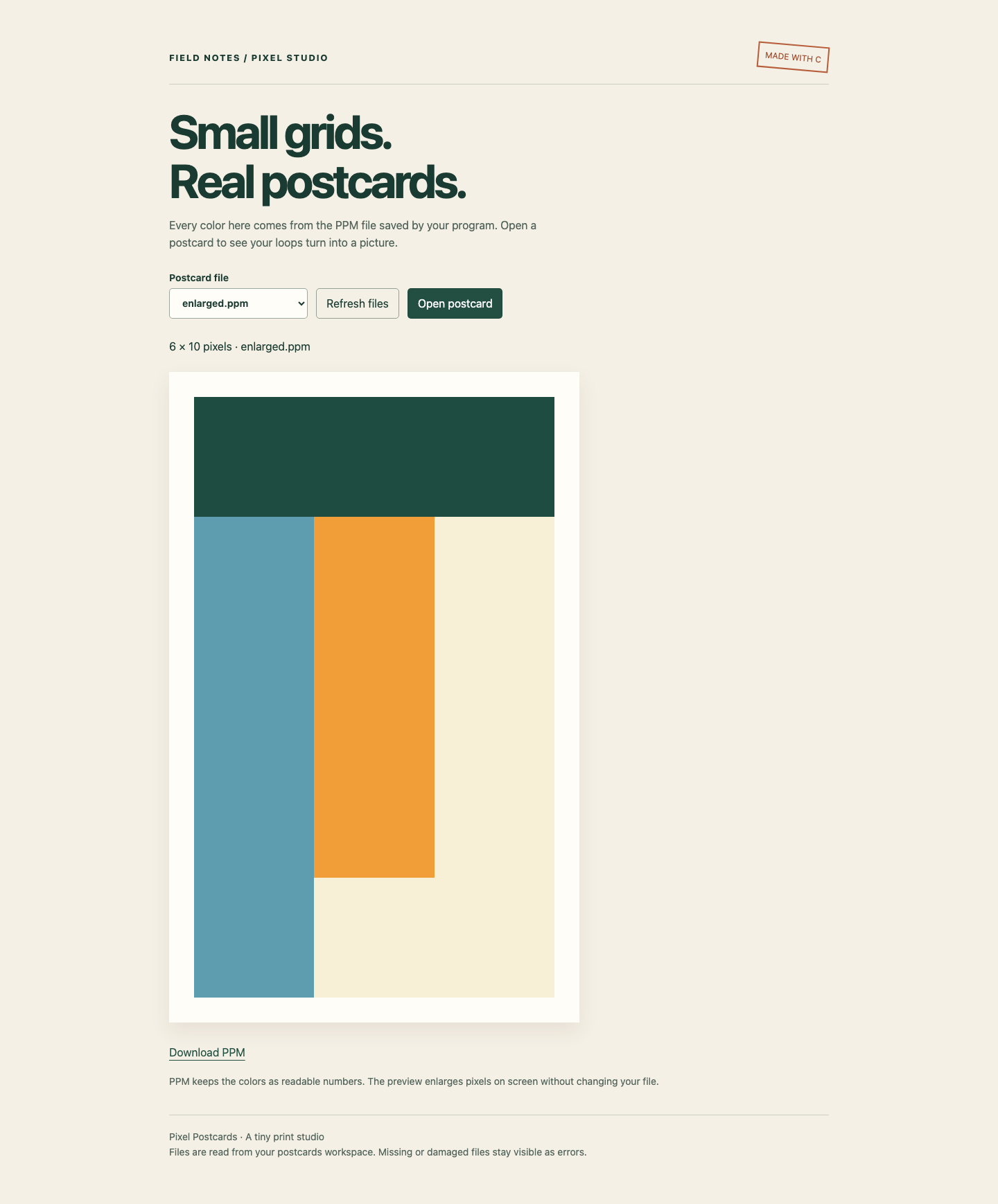
The original 15 pixels each became a 2-by-2 block: 60 pixels in total. Switch to Postcard Preview, refresh files, select enlarged.ppm, then Open postcard. It has the same direction and proportions as rotated.ppm. The on-screen preview scales both to fit, so read the dimension label to distinguish actual file sizes. Download the enlarged file using Download PPM.
The screenshot shows the clockwise view with 6 × 10 saved pixels. The dark strip is now the top row; the image keeps the same proportions as the rotated file.
Return to Workspace. A scale of zero would make no useful image. The next command is an intentional failure. Use a new file name because > opens and truncates a file before the executable can reject its options. echo $? immediately prints the preceding command's exit status; 0 means success, and 2 is this program's argument error.
./card 1 0 > rejected.ppm
echo $?
You should see Scale must be an integer from 1 to 4 and then 2. Check the rejected file with the taught decoder:
python3 /home/labex/.local/share/pixel-postcards/inspect.py rejected.ppm
This command also intentionally fails with Cannot read postcard: Expected a P3 header. There are no pixels to decode. It is different from a missing file: the shell created an empty file before the C program ran. In Postcard Preview, refresh files and open rejected.ppm to see the error rather than a previous image. Open enlarged.ppm again to recover the normal view. The three good output files remain intact.
Keep card.c, executable card, supplied art.h and cli.h, plus original.ppm, rotated.ppm, and enlarged.ppm. The generator must handle both rotation values and every scale from 1 to 4 for supplied patterns up to 16 columns by 16 rows; it must not hardcode this image's dimensions or pixel colors. Equivalent loops and coordinate expressions are welcome. Invalid arguments must fail with an error message and no image header. The supplied parser already supplies that behavior.
Summary
You traced a pixel through a clockwise turn, reversed enlargement with integer division, and combined those mappings in two C functions. You produced original, rotated and enlarged images and distinguished argument rejection from malformed or missing files.