Introduction
A candidate fingerprint makes an archive search cheaper, but it is not proof of identical content. You will finish a read-only duplicate finder that confirms real bytes and keeps every relative path in each duplicate group.
This lab assumes the binary-reading and SHA-256 ideas from the preceding lab, plus Java classes, lists and exceptions. It starts independently with a completed digest and a new copy of the gallery. You implement grouping; the directory, report and launcher adapters are prepared. Author-estimated time is 55 minutes.
Confirm Each Candidate with Real Bytes
In this step, you will implement byte comparison, observe it before grouping works, then finish the subgroup decisions inside the finder. This independent lab already includes the completed digest and a new gallery.
Open WebIDE, choose File → Open Folder..., enter /home/labex/project/duplicates and click OK. When EXPLORER shows DUPLICATES, choose Terminal → New Terminal. Use that integrated terminal for the following commands; editor tabs remain inside WebIDE.
cd /home/labex/project/duplicates
./run.sh Sample
The normal example decodes real PNGs and shows renamed equal bytes and same-size different bytes. Sample does not call Sha256 or Finder; it supplies the example you will now compare through your own method. The launcher builds saved src/*.java freshly each run; compiler/JVM child processes use C.UTF-8 and explicit UTF-8 source/text settings without changing your shell.
Open Digester.java, Finder.java and Main.java from the file tree. Main calls Finder.find(root, new Sha256()). The public find(Path root, Digester candidates) returns a list of duplicate groups; each group contains every member's path relative to the root. root.relativize(path) makes that relative path; root.resolve(relative) locates it for reading. The other public method, sameBytes(left, right), must compare actual content. Keep these public entry points; private helper names and collections may differ.
Before the first edit, back up only the source:
cp src/Finder.java work/Finder.java.before-edit
In the Finder editor, click the source, open Find with Ctrl+F (Command+F on macOS) and search for public static boolean sameBytes. Close Find using its ×, then click the source again. Select only the throw statement inside that method, retaining the signature and braces.
Predict the results first: red versus blue should be false despite equal sizes; red versus renamed should be true despite different paths. Start by rejecting unequal sizes. Then open both streams with try-with-resources. read() returns a byte value from 0 through 255, or -1 at end of file. A differing value ends the comparison immediately; finishing together establishes equality.
Replace the throw with this small method body:
if (Files.size(left) != Files.size(right)) return false;
try (InputStream a = Files.newInputStream(left);
     InputStream b = Files.newInputStream(right)) {
    int value;
    while ((value = a.read()) != -1) {
        if (value != b.read()) return false;
    }
    return b.read() == -1;
}
Both streams close even on an early return or read error. Single-byte reads keep this example easy to follow. Safe buffered or full-array byte comparisons are also valid; they have different memory/performance tradeoffs. A reading failure must propagate, not become false or a successful empty result.
Choose File → Save for Finder and wait until its tab shows the close ×. Auto Save may already be enabled; leave it as it is. Read the disk version in the integrated terminal:
cat src/Finder.java
Confirm the new comparison body. If the disk still has the throw, return to the correct tab, save again, confirm the saved state and repeat the read before compiling.
Probe is a prepared, visible caller. Its compare LEFT RIGHT mode calls your public sameBytes directly and prints the returned boolean; it contains no independent equality implementation. Grouping may still be unfinished.
./run.sh Probe compare data/gallery/red.png data/gallery/blue.png
Expect sameBytes: false.
./run.sh Probe compare data/gallery/red.png data/gallery/copies/renamed.png
Expect sameBytes: true. These are current saved-source results, rather than fixed success messages.
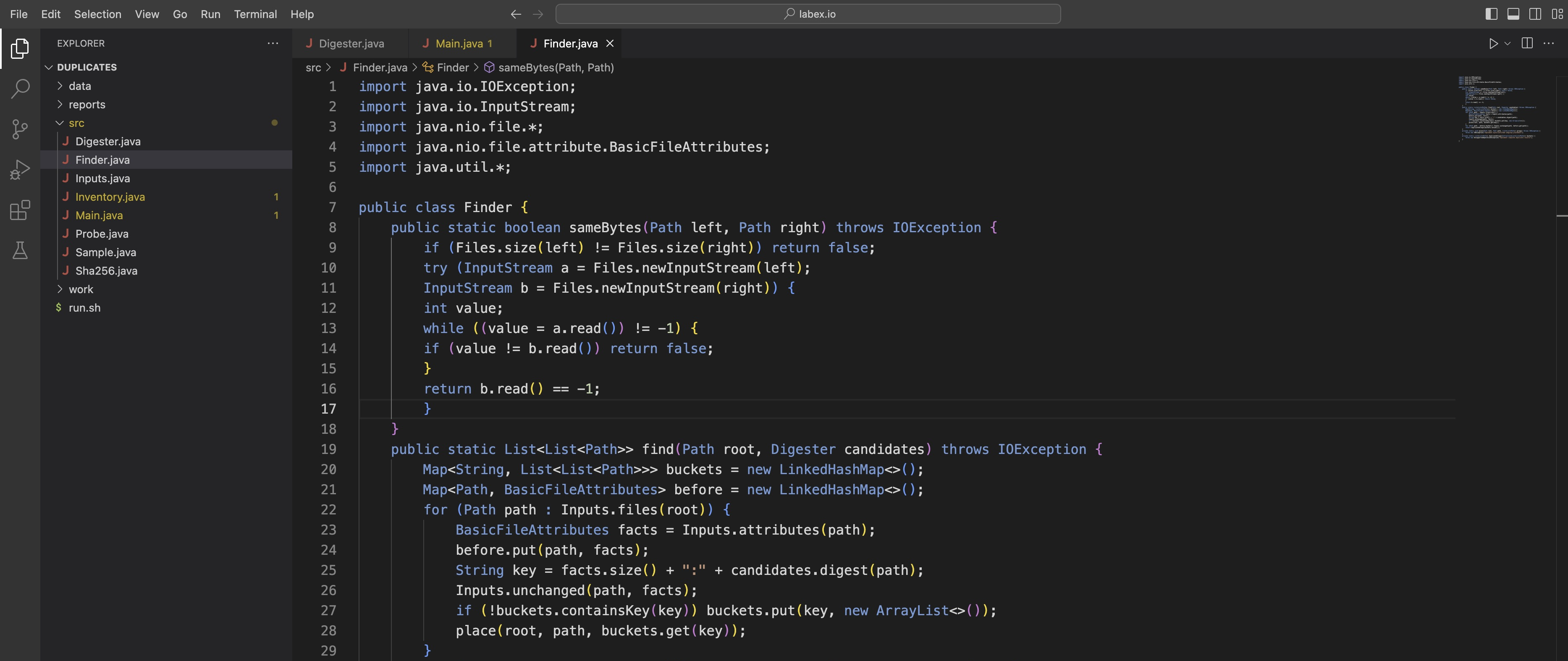
In EXPLORER, open src/Finder.java. Its breadcrumb locates sameBytes, and the tab's close × indicates the saved state. The comparison body belongs inside this method; keep the surrounding find framework.
Now read find in Finder. Its prepared framework walks the input safely, records each original file's metadata, combines size and supplied digest into a candidate key, and retrieves that key's possible groups. A Map associates a key with a value: containsKey checks for a key, put creates its value, and get retrieves it. List<List<Path>> is a list whose elements are themselves lists of paths.
Each candidate bucket may hold several real byte groups. Imagine six equal-size files: three contain red, two contain sky, and one contains sun. A controlled digester can give all six the same candidate string. They still require three byte subgroups, of which only the first two belong in a duplicate report. A candidate match is not the final decision.
The before map stores each Path and its metadata; before.keySet() returns those paths for the final change check. buckets.values() supplies the bucket lists to duplicateGroups. The prepared adapters reject unsupported entries and detected changes; they do not lock or freeze a tree. Preserve this safety behavior. Every hardlinked path still matters; file identity detects changes, not a reason to discard a path.
Find private static void place, close Find with ×, and select only its throw statement. You must place this path in exactly one byte-confirmed subgroup. Search all subgroup representatives; append the current relative path on a real match. If there is no match, create another subgroup. Do not stop accepting paths after two copies.
Write this method body:
boolean placed = false;
for (List<Path> group : groups) {
    if (sameBytes(path, root.resolve(group.get(0)))) {
        group.add(root.relativize(path));
        placed = true;
        break;
    }
}
if (!placed) {
    List<Path> group = new ArrayList<>();
    group.add(root.relativize(path));
    groups.add(group);
}
group.get(0) is the representative relative path. placed records a match; break stops that inner search after adding the path once. Without that match flag, a matching file could also start a new subgroup. The surrounding find loop already visits every file, so a third matching path reaches the same decision.
Next find private static List<List<Path>> duplicateGroups, close Find, and replace only its throw. Collect all groups with at least two paths; singletons are real files but not duplicates:
List<List<Path>> result = new ArrayList<>();
for (List<List<Path>> groups : buckets) {
    for (List<Path> group : groups) {
        if (group.size() > 1) result.add(group);
    }
}
return result;
Choose File → Save, confirm the saved state, and inspect the saved methods:
cat src/Finder.java
Before scanning the gallery, create the six-file controlled example in disposable work/candidates. mkdir -p creates the directory if needed. printf writes exactly its quoted text; > creates or replaces only the named practice file, without adding a newline here.
mkdir -p work/candidates
printf 'red' > work/candidates/a1
printf 'red' > work/candidates/a2
printf 'red' > work/candidates/a3
printf 'sky' > work/candidates/b1
printf 'sky' > work/candidates/b2
printf 'sun' > work/candidates/lone
All six files contain three bytes. Probe's candidates ROOT mode gives your same public find method a Digester that always returns controlled-candidate. It prints only the groups returned by your implementation, without filling in or repairing them. It does not call Sha256 in this mode. This is a controlled candidate-collision example, not a real SHA-256 collision.
./run.sh Probe candidates work/candidates
Expect Controlled candidate groups: 2, then a GROUP/PATH header and rows connecting a1, a2, a3 in one group and b1, b2 in another. lone must be absent. Group labels and order may differ. One merged six-path group or only two red paths is an incorrect result even if the command exits zero.

Read the actual membership: a1, a2 and a3 share one group, while b1 and b2 share another. lone is absent. Equal candidate values have been separated by actual bytes.
Finally run the real application with SHA-256 candidates and a report outside the gallery:
./run.sh Main data/gallery reports/groups.tsv
Expect Scan complete: 3 duplicate groups. The completed byte comparison must actually participate in the grouping route, not sit unused in a method.
If compilation fails, read the source filename and line, open that location and correct only the local edit. Save, confirm the saved state and read cat src/Finder.java before rerunning; do not interpret an old report as a result of a failed build. If necessary, cp work/Finder.java.before-edit src/Finder.java restores only Finder to its initial unfinished form; reopen it and repeat the method edits. It does not reset original data or progress elsewhere. Never rerun setup as recovery.
Read the Whole Group and Rerun After a Change
In this step, you will read the completed report and see it follow current bytes. Continue in the same WebIDE integrated terminal at /home/labex/project/duplicates.
cat reports/groups.tsv
The UTF-8 TSV header is GROUP, then PATH. Each row identifies one relative path; equal group labels connect equal contents. The labels themselves are not file identities and their order is unimportant. The red image group must contain all three paths, the two empty files form a valid group, and the two partial-buffer binary files form another. The blue image and distinct same-name readme files are not duplicates. Each reported path identifies a real file under data/gallery (the scan root relative to the current working directory); no input is removed.
Try a change using disposable copies in work, keeping the gallery originals untouched. mkdir -p creates the practice directory if needed. cp copies one file to a new path.
mkdir -p work/mini
cp data/gallery/red.png work/mini/first.png
cp data/gallery/copies/renamed.png work/mini/second.png
./run.sh Main work/mini reports/practice-before.tsv
Expect one duplicate group. Now printf writes the quoted text and its newline; > replaces only the disposable second file. It no longer contains a PNG, so its extension is not evidence of its contents.
printf 'changed\n' > work/mini/second.png
./run.sh Main work/mini reports/practice-after.tsv
Expect zero duplicate groups. The report still has its header:
cat reports/practice-after.tsv
A successful empty result differs from a failed scan. The next command deliberately requests a report inside the input tree. Expect Scan failed, exit status 2, and no new input file:
./run.sh Main data/gallery data/gallery/report.tsv
Correct the output path and regenerate the gallery report:
./run.sh Main data/gallery reports/groups.tsv
The prepared report adapter writes a new sibling temporary file and replaces the output path after scanning succeeds. It does not open an existing hardlink for writing, so a report path cannot overwrite original bytes through that link. This is not a crash-durability guarantee. If a read fails, the command fails and any older report is not current evidence; never silently skip a file and announce success.
The final check exercises your current source in isolated fixtures and reads the actual gallery report. It checks complete groups, current content, errors and preserved originals. A previously correct report cannot excuse subsequently broken source.
Summary
You narrowed candidates with size and SHA-256, confirmed actual bytes, preserved every duplicate path, and regenerated a report after a real change. Successful zero groups and a failed scan now have distinct meanings.