



Introduction
Still & Spoke's labels, conditional seating note and responsive layout are prepared. The current work handler explicitly says that it has not sent a request. You will implement the asynchronous submission and field-refusal handling, so a confirmation reflects what the studio actually accepted. A correct-looking page is not a booking.
You need HTML forms, basic CSS layout, JavaScript objects, functions, DOM selection and events. This lab teaches JSON, async/await, fetch, HTTP outcomes, pending state and recoverable feedback. The first lab is useful preparation, but no files or processes from its VM are required. Only edit /home/labex/project/stillspoke/request.js and feedback.js in WebIDE. Preserve the other frontend files, API, capacity and existing visitors. All identities are synthetic; no email or payment is sent. The 60-minute duration is an author estimate, not a measured beginner result.
Use Workspace for the read-only inspection commands and Studio for the website. Study form is an independent working example; its bookings never complete Work. Studio records reads accepted bookings. Practice room is a separate training page that can refuse one request before accepting anything. Each unit has its own data. The prepared backend, production deployment, arbitrary-client idempotency and complete accessibility compliance are outside the task.
Send One Real Request and Wait for Its Answer
In this step, implement the submission inside an existing event handler, prevent duplicate activation while it is pending, and show the service's actual confirmation.
In Studio, choose Study form. Use Tab to Your name and enter Example Guest; Tab to Email and enter sample@example.test; Tab to Session, type C, and read Clay, slowly / 10:00. Tab past the unchecked assistance checkbox and optional note to Reserve my place. Press Enter once. Wait for the real Confirmation SS-…, choose Studio records and match the name, email and time. Return through Back to signup and Work form. That example uses a separate database.
The study page shows the expected result shape. Your issued number will differ.

On Work, fill Morgan Vale, morgan@example.test, choose Clay, slowly / 10:00, leave assistance unchecked and submit once. The current result says Not sent. This form has not sent a booking request yet. It is an explicit incomplete state, not a fake confirmation. Studio records still contains only the two existing visitors. Return with Back to signup before editing. Your code must change that behavior by actually sending a request.
The prepared API has the following public fields. Configuration arrives through the server-provided scenario.js URL in the page's script list; it is not a local file to find in Explorer.
| JSON field | Meaning |
|---|---|
name |
At least two characters after trimming outer whitespace. |
email |
A synthetic address ending in @example.test. The browser first checks native email syntax. |
session |
A listed stable ID: clay-morning for 10:00 or clay-afternoon for 14:00. Afternoon is already full. |
support |
A Boolean indicating whether seating assistance is selected. |
note |
A string; when assistance is selected, the service requires at least five characters after trimming outer whitespace. Otherwise optional. |
A POST proposes a new booking to api/bookings. This relative URL stays under the current work or example business space. The API returns JSON, a text format for objects, strings, numbers and Booleans. JSON property names and strings use double quotes. JSON.stringify(data) converts the JavaScript object to JSON text; response.json() parses returned JSON into an object. Content-Type: application/json tells the service what the body contains. Neither the frontend text nor a disabled button implements capacity.
| HTTP status | Response and what it establishes |
|---|---|
201 |
booking has the accepted fields, readable sessionTitle and server-generated id beginning SS-. A booking was accepted; never invent its number. |
422 |
errors maps field names to explanations. Nothing was booked; correct the marked fields. |
409 |
The selected session is full. Nothing was booked; choose another session. |
503 |
The controlled practice pause refused the request before acceptance. Nothing was booked; retry is safe. |
fetch returns a Promise, representing a result that arrives later. An async handler can await that result while the browser remains usable. Await both the HTTP response and its JSON parsing. HTTP 422 or 503 still resolves fetch; it does not automatically enter catch. Inspect the returned status. A connection or parsing failure can enter catch without proving whether the request was accepted, so that message must leave acceptance unknown.
Switch to WebIDE. In Explorer, expand project / stillspoke and open request.js. The existing references find the form, button and passive progress element. The provided async submit listener already calls event.preventDefault() to stop ordinary form navigation. Native-invalid inputs stop submission before this handler. Read its current body; do not paste a second listener or redeclare its variables.
form.elements finds controls by their HTML name, not their position, label or id. Predict the five values for the unchecked submission you just tried: in particular, support must be false, not the checkbox's usual string value. Text controls expose .value; the checkbox exposes .checked. Keep these distinctions when building the data object below.
pending is already declared outside the handler so it persists between events on this page. Its guard must run before a second request can start. Set it and disable the native button before the first await; otherwise repeated activation could slip into the wait. This is a one-page in-flight guard, not arbitrary-client idempotency. try performs the work, catch gives an unknown-acceptance result on failure, and finally restores the button, pending flag and passive sending text for every outcome. Do not reset the form's values.
clearErrors, showMessage and showResponse are supplied by feedback.js. The page defers scenario.js, validity.js, feedback.js and request.js in that order after HTML parsing. These supply data, conditional constraints, feedback functions and the request listener. The current feedback functions already handle a real 201 and generic refusals; the next step adds the missing field association.
Click in the editor before using Ctrl+F or Cmd+F to find a fragment; Escape returns from Find. Save with Ctrl+S or Cmd+S. Auto Save may be enabled too. For an accidental edit, undo with Ctrl+Z or Cmd+Z, inspect the intended local change, and save; do not replace the whole file or create another request listener.
Find the current showMessage('Not sent. This form has not sent a booking request yet.'); statement. Select that whole line, including its leading indentation, and replace only that line with the handler body below. Keep the existing event.preventDefault(); immediately above, the listener's closing }); below, and the four declarations at the start of the file:
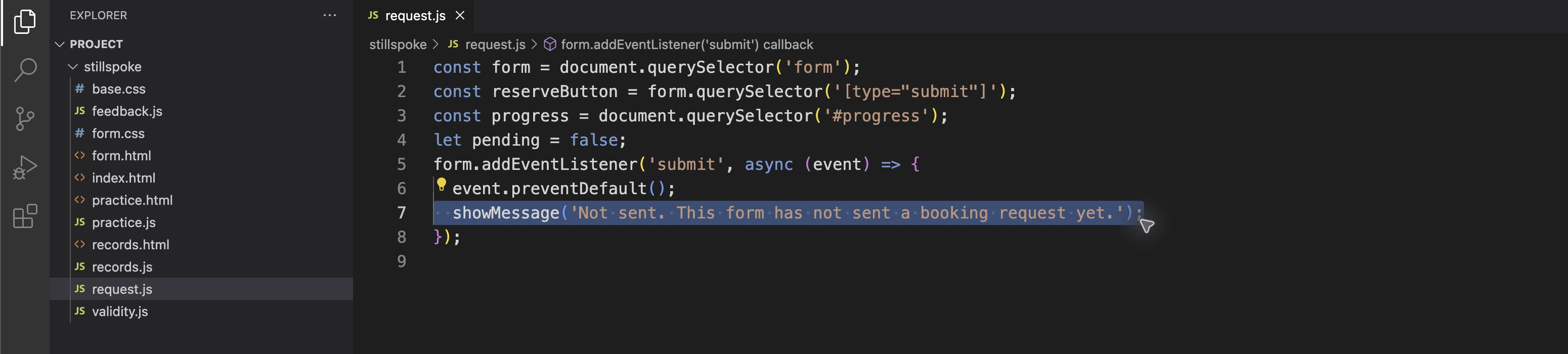
Before editing, select only the Not sent statement, including its indentation. Keep the declarations, submit listener and preventDefault call around it.
  if (pending) return;
  clearErrors();
  document.querySelector('#result').hidden = true;
  const data = {
    name: form.elements.name.value,
    email: form.elements.email.value,
    session: form.elements.session.value,
    support: form.elements.support.checked,
    note: form.elements.note.value
  };
  pending = true;
  reserveButton.disabled = true;
  progress.textContent = 'Sending your request...';
  try {
    const response = await fetch('api/bookings', {
      method: 'POST',
      headers: { 'Content-Type': 'application/json' },
      body: JSON.stringify(data)
    });
    const body = await response.json();
    showResponse(response.status, body);
  } catch (error) {
    showMessage('No confirmation received. Acceptance is unknown. Check Studio records; wait for the original attempt to be resolved before a new submission.');
  } finally {
    pending = false;
    reserveButton.disabled = false;
    progress.textContent = '';
  }
Read the result from top to bottom: guard, current values, pending, request, parsed response, unknown failure, cleanup. Save request.js now, using the editor shortcut with the code area focused.
Return to Studio, refresh Work, and enter Morgan Vale, morgan@example.test, Clay, slowly / 10:00, assistance unchecked and an empty optional note. Tab to Reserve my place and press Enter once. While Sending your request... is visible, the button is disabled. Wait for Submission result, Reserved for Morgan Vale, a genuine Confirmation SS-… and the readable 10:00 title. The passive role="status" paragraph is never focused; the ordinary result section may receive focus to make its heading and outcome easy to find.
Choose Studio records, match the complete new booking and keep Existing Visitor and Avery Reed. Return through Back to signup. The earlier Not sent interaction did not create this record; this one comes from the actual 201 response. Self-check: a genuine accepted row corresponds to the submitted values, pending prevents repeated activation, and the button becomes available afterward. Field refusals still lack their associated input error; that is the next change.
Associate a Server Refusal with the Right Field
In this step, add field-specific handling to the existing feedback function, keeping the working success path and the visitor's other input.
Native email syntax does not establish the service's synthetic-domain rule. morgan@other.test is syntactically valid and reaches the service, which returns HTTP 422. This differs from the browser refusing morgan.example.test before a POST. Read this response shape as data, not a command:
{
  "message": "Please correct the marked fields. Nothing was booked.",
  "errors": {
    "email": "Use an address ending in @example.test for this practice."
  }
}
errors.email names the API field email. That corresponds to form.elements.email; an error on name corresponds to the control whose HTML id is person. Label target, page ID and JSON/error key have related but different responsibilities. Do not choose the first error paragraph or always mark Email.
In WebIDE, open feedback.js. Read clearErrors, showMessage and showResponse. The first removes old invalid flags and message text without removing persistent help. The second reveals and focuses the ordinary result section. The existing 201 branch takes body.booking and displays its actual name, ID and readable title. Leave these functions and the success branch intact.
The success message uses a template literal: backticks surround the text and ${booking.id} inserts a property value into a string. textContent displays it as text, not server-supplied HTML. A template literal does not make a number authoritative; the number must still come from the accepted response.
The new branch needs to visit the keys in body.errors. Object.keys returns an array of those names, and for (const name of ...) visits each. A string in brackets selects a matching property or form control. let first remembers the first rejected field; unlike const, a let binding can be assigned later. It starts as undefined, meaning no value has been assigned. !first is true before a field is remembered. Once the first field element is assigned, !first becomes false, so later iterations keep that original field. The final focus therefore goes to the first actual error in the response. Fill its prepared error paragraph with textContent, mark the field with aria-invalid="true", and finally focus that field. Its aria-describedby already connects the visible reason to the control, alongside the persistent help.
Find the single } else { line after the 201 branch in showResponse. Select the entire boundary line, including its indentation, and replace it with the following branch and its final else boundary. Keep the existing showMessage(body.message); and braces below it. Do not rewrite the 201 branch or clearErrors:
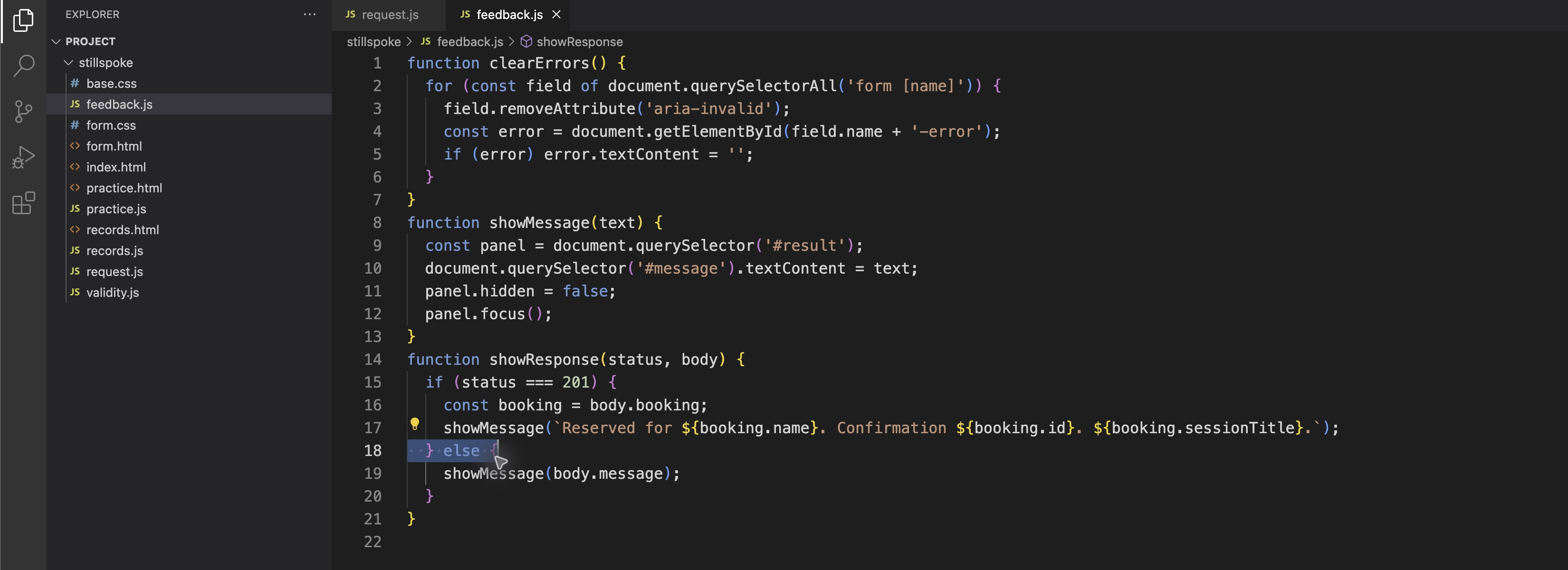
Before adding the 422 branch, select only the else boundary. The existing 201 confirmation and generic message below remain in place.
  } else if (status === 422) {
    showMessage(body.message);
    let first;
    for (const name of Object.keys(body.errors)) {
      const field = document.querySelector('form').elements[name];
      document.getElementById(name + '-error').textContent = body.errors[name];
      field.setAttribute('aria-invalid', 'true');
      if (!first) first = field;
    }
    first.focus();
  } else {
showMessage first makes the overall result readable. The final first.focus() then leads correction to the actual invalid field. Other outcomes can leave focus on the ordinary result section; passive status announcements should not be forcibly focused. Save feedback.js.
Return to Studio, refresh Work and enter Morgan Vale, morgan@other.test, Clay, slowly / 10:00, assistance selected and A seat near the entrance. Submit once. Read the overall Nothing was booked result and the new email-specific explanation. Focus should move to Email, and its visible label and help should remain. Name, session, checkbox and note must stay unchanged.
Check Studio records without replacing this draft: use the browser's Open Link in New Tab command on the link, read that page and return to the original form. It must not gain a record for the refused address. Correct only the email to morgan@example.test and submit again. The old field error clears, a genuine new confirmation appears and the note is in the accepted record. Existing visitors and the earlier unchecked booking stay.
Now test a different server key. With the other fields valid, replace the name with exactly two spaces and submit once. Native minlength="2" counts those typed characters, but the service trims outer whitespace and rejects that name. The actual 422 must mark and focus Your name, not always Email, while retaining the other values. Restore Morgan Vale. Repeated synthetic names in accepted bookings are permitted; this is not an email-uniqueness system.
If you typed morgan.example.test, expect a native syntax refusal, then correct it to morgan@other.test for the server test. If an association is missing after editing, reopen feedback.js, compare only the new 422 branch and save; keep the help IDs and already working success branch. Use Workspace to inspect actual disk contents if the browser still shows an older result. cat only displays the saved file; it does not edit it:
cd /home/labex/project/stillspoke
cat feedback.js
If the current result instead says acceptance is unknown, keep the original form page and follow Step 3's original-attempt resolution boundary before any new submission. Editing or refreshing does not prove that attempt was rejected. For the known 422 correction here, repair the local typo in WebIDE, save and refresh Studio; do not clear records or restart setup. Self-check: the real server key reaches its own field/error relationship and focus, input survives, and a correction can still succeed through the preserved 201 branch.
Recover from Full Sessions and a Safe Service Pause
In this step, keep a draft through two different business refusals and distinguish the explicitly safe retry from an unknown request outcome. No further code change is needed for these tests.
In Studio, refresh Work and enter Casey Brook, casey@example.test, Clay, slowly / 14:00, assistance selected and A seat near the entrance. Typing C initially selects the first matching Clay option; typing it again cycles to the next match. Read the displayed 14:00 choice instead of treating a key as a fixed position.
Submit once. HTTP 409 means that this valid proposal reached a full session. Read That session is full. Nothing was booked; choose another session. The values stay and the submit button becomes available. Keep the existing 14:00 visitor; deleting them to make space is outside the task.
Change only the session to Clay, slowly / 10:00. Choose Practice room. It opens a separate browser page, leaving the original form and its draft open. Choose Pause next submission and wait for Next submission will be refused before a booking is accepted. Close the practice page or switch back to the original Studio form. Do not replace that still-open form by using the practice page's Back to signup link.
This training control makes a specific pre-acceptance promise:

Submit the original form once. The actual 503 result says Nothing was booked. Service paused; please retry. Name, address, selected session, checkbox and note remain. The request consumed the one pause. With those values retained, activate Reserve my place once more. Wait for the true 201 confirmation. Use Studio records to match Casey's fields, the readable 10:00 title, note and issued number, keeping all old visitors and earlier bookings. Return using Back to signup after reading; a completed booking persists even if later navigation clears unsent fields.
This retry is safe only because the practice service explicitly refused before acceptance. A lost connection or unreadable response is different. catch says acceptance is unknown, not Nothing was booked. Open Studio records in another browser page so the unresolved form remains available. A matching row may help locate a confirmation, but repeated names and values do not always identify which attempt produced it. A successful read with no match does not prove rejection: the original request may still be in flight. Wait for that attempt to be resolved or ask the studio operator/instructor before another submission; wait for the service too if records are unreadable. This lab does not promise arbitrary-client idempotency or teach a distributed payment workflow.
For an ordinary code-spelling problem, switch to Workspace and read the actual saved request file:
cd /home/labex/project/stillspoke
cat request.js
Check the exact relative URL api/bookings, JSON.stringify, both await expressions and the finally block. In WebIDE, locate and repair only the affected statement, save and return to the original Studio page. Compare the handler body with Step 1 rather than replacing the whole file or duplicating its listener. Editing, saving or refreshing does not establish that an earlier unknown request was rejected. Resolve it first using the boundary above. Once it is known resolved, refresh to load the repaired script and perform the relevant normal test with a new synthetic name. Do not reset the VM or remove accepted rows for a JavaScript typo.
Self-check: full and paused outcomes have truthful readable feedback after pending ends, retain the draft and restore submission; only the known pre-acceptance refusal gives a safe immediate retry. Equivalent clear error wording is valid. A normal accepted work booking remains, and the read-only check does not send a live booking or repair your handler for you.
Summary
You sent JSON through an awaited POST, distinguished HTTP refusals from connection uncertainty, guarded pending activation and displayed the actual accepted confirmation. You associated server field errors with their controls, retained input through full and paused outcomes, and used records to guide recovery without assuming every failed connection means nothing was accepted.