
Introduction
A community workshop has two signup-page versions, A and B. Before comparing them, its analyst must decide what counts as one observation. One visitor can visit three times or click signup twice, while another never generates an event. Counting those event rows as separate people would distort the comparison.
You will first read a six-person worked example, then build one seven-day binary outcome for every assigned visitor in a larger, fixed experiment. The records are original synthetic teaching data representing a randomized allocation, not live visitor tracking or evidence about a real business. Python, pandas, NumPy, SciPy and Matplotlib are prepared in an independent environment with WebIDE for local Python edits and its terminal for commands, plus Results to view and download actual saved artifacts. You need basic terminal navigation, Python functions and introductory pandas table selection; the required joins and time operations are explained here. Statistical inference is not a prerequisite. The 65-minute duration is an author estimate including reading and ordinary corrections.
Compare People Instead of Clicks
In this step, you will read six visitor cards, predict their group rates and implement the comparison inside a prepared Python function.
Open the workspace and read a normal example
Open the WebIDE Tab. In its File menu, choose Open Folder..., enter /home/labex/project/signup-experiment and open that folder. The Explorer on the left lists the course files. If it is hidden, select the Explorer icon in the left activity bar. You will edit files here and run them in this same workspace; opening a file does not run it.
For saving, use WebIDE’s File > Save menu. Optional shortcuts are Ctrl+S on Windows/Linux and Cmd+S on macOS. For Find, click inside the code editor first; use Ctrl+F or Cmd+F for the same respective platforms, then Esc to return to editing.
In WebIDE, choose Terminal > New Terminal. This opens a terminal panel below the editor. A new terminal has its own current directory. cd changes that directory; enter the workspace explicitly:
cd /home/labex/project/signup-experiment
pwd prints the current directory and ls lists its files. Use these whenever a path or filename seems wrong:
pwd
ls
cat displays a text file without changing it. Read the six-person worked example:
cat warmup-visitors.csv
Each row is one assigned visitor. The first three belong to A and the last three to B. qualifying_signup_events has already been classified inside each person's seven-day window for this small example. The binary outcome signed_up is 1 if at least one qualifying signup occurred, otherwise 0.
P-8 has three visits and two signup events, but contributes one person and one positive outcome. Q-3 has no event and remains an assigned person with outcome 0. Before using Python, count the cards: A has one signup among three assigned people; B has two among three.
A's rate is 1 / 3, about 33.33%; B's is 2 / 3, about 66.67%. B minus A is about +33.33 percentage points. Percentage points subtract percentages directly; this is not a relative percentage increase. More visits do not enlarge either denominator.
Read the function boundary before editing
Select compare.py in Explorer. Its summarize(people) function receives a pandas DataFrame with visitor_id, group and signed_up columns. The prepared dictionary result, the loop over A and B, and return result are already present. The two marked regions deliberately raise NotImplementedError: they identify work you will implement, rather than return a fabricated result.
Select run.py and find its warmup branch. It reads the actual six-person CSV and calls summarize; it does not supply a completed comparison. Return to compare.py. The following first run is intentionally incomplete: it should end with NotImplementedError: Implement group_rates. and exit nonzero. It has not changed the input cards.
python3 run.py warmup
Make a local checkpoint before editing. cp copies the first path to the second; the .bak suffix makes this a backup, not another Python module:
cp compare.py compare.before-rates.bak
Implement the rates and their difference
Inside summarize, each loop iteration names one group. A Boolean mask, people["group"] == group, selects that group's rows. len(selected) counts assigned people; summing the binary outcome counts people who signed up. int gives a normal Python integer for JSON. The rate divides the positive count by all assigned people, including people with no event.
In compare.py, find Implement group_rates. after clicking inside the editor: use Ctrl+F on Windows/Linux or Cmd+F on macOS, then press Esc to return focus to the editor. Select only its comment and raise NotImplementedError(...) line inside the loop. Replace those two lines with the following code. Keep eight spaces before selected, assigned, signed_up and result[group]; these statements belong inside the existing loop. The closing brace aligns with result[group].
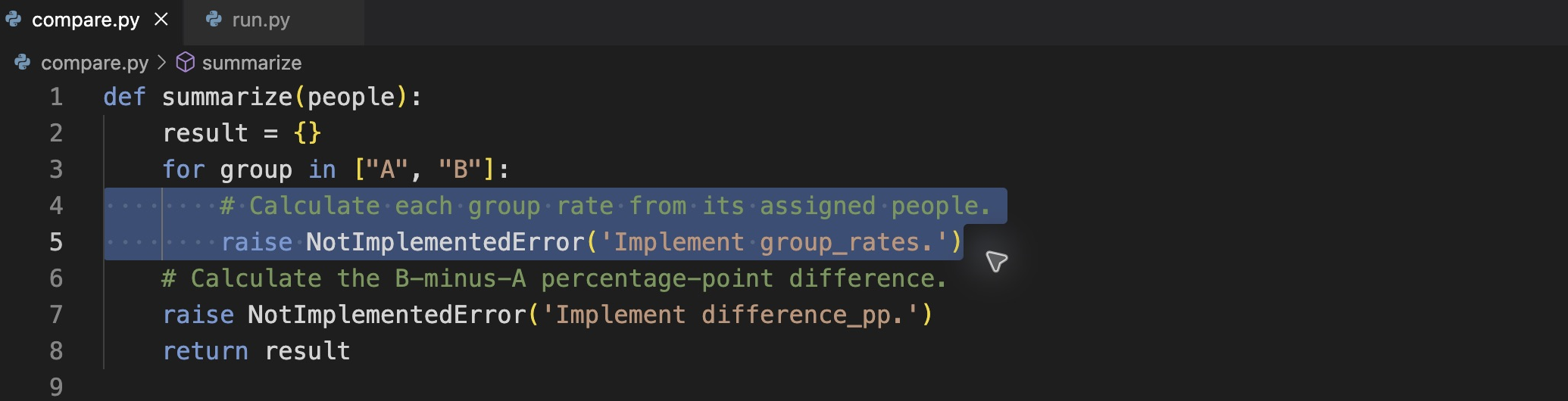
Select only the two pending group-rate lines inside the existing loop. Keep the loop, the later difference region and return result in place.
        selected = people[people["group"] == group]
        assigned = len(selected)
        signed_up = int(selected["signed_up"].sum())
        result[group] = {
            "assigned": assigned,
            "signed_up": signed_up,
            "rate_pct": 100 * signed_up / assigned,
        }
Below the loop, replace only the comment and raise for Implement difference_pp. with this assignment. Its four-space indentation puts it inside the function but outside the loop, after both rates are available. Keep the existing return result below it.
result["difference_pp"] = result["B"]["rate_pct"] - result["A"]["rate_pct"]
Choose File > Save to save compare.py before running. The editor's unsaved-change indicator should disappear. A running Python command reads the saved file on disk, not an unsaved editor buffer. Do not replace the whole file or add a second summarize definition.
Return to the WebIDE terminal panel and run the same stage:
python3 run.py warmup
python3 runs Python; warmup selects this prepared input. The actual return value is saved as output/warmup.json. JSON stores named objects and numbers. Read that saved file through the prepared reader:
python3 show_results.py warmup
Confirm assigned counts 3 and 3, positive counts 1 and 2, and a difference near +33.33 points. Keep unrounded numbers in your results; the rounded values in this explanation are for reading only. A larger observed rate alone does not establish that B improved a page.
Switch from WebIDE to the separate Results Tab. All files / Refresh lists actual saved files; choose View beside output/warmup.json. Confirm the same counts. Download returns that file's original bytes. Missing files stay missing: Results never runs your function, fills answers or redraws charts. Return to WebIDE for further editing and commands. Opening or reconnecting a Tab does not reset the workspace.
Correct an ordinary edit without resetting the lab
A traceback names the saved Python file and line where execution stopped. IndentationError usually means a line has the wrong leading spaces; SyntaxError can indicate a missing quote, bracket or brace. In Explorer open the named file, fix that local line, choose File > Save and rerun the same command. If NotImplementedError remains, check which named region is still incomplete and whether you saved the edited file.
If you need the original comparison scaffold, the following copy restores only compare.py from the checkpoint you just made. It removes your rate edits from that module; your CSVs and other files remain. After restoring, reapply the two regions above and save before running again. This is an optional recovery command, not part of a successful run:
cp compare.before-rates.bak compare.py
You may change compare.py and, next, outcomes.py, or add regular Python helper files beside them. Preserve assignments.csv, events.csv, warmup-visitors.csv, config.json, data-dictionary.md, run.py and show_results.py. Each later unit initializes its own files; none depends on this VM.
Build Complete Seven-Day Outcomes
In this step, you will associate raw events by visitor identity and implement one seven-day binary outcome for every assigned person.
Continue in WebIDE, with the terminal panel at /home/labex/project/signup-experiment. Read the field definitions and original tables before editing:
cat data-dictionary.md
cat assignments.csv
cat events.csv
The full table has 12 assigned people, six per group. visitor_id is a stable text identity, not a row position. Events repeat people and include an unrelated OUTSIDE visitor, so zipping the two tables by row number would associate the wrong records. This synthetic log is complete: no qualifying event means no signup, rather than an unknown outcome.
Every person has a timezone-aware allocation instant, assigned_at. The window is [assignment, assignment + seven days): the start counts and the exact upper boundary does not. UTC is a common time reference; 12:00:00+02:00 and 10:00:00Z describe the same instant. Read the fixed analysis instant:
cat config.json
All supplied windows end by analysis_at. Do not change that instant to make an unfinished follow-up appear complete. The course's bounded input tables have 4–14 people, at least two per group. Duplicate assignment IDs, including conflicting groups, are invalid; choosing whichever duplicate looks favorable is not a repair.
Read the prepared validation, then predict the outcomes
Open outcomes.py in Explorer. build_people(assignments, events, analysis_at) starts with a copy, so it does not rewrite the original assignment table. Its existing guards refuse empty or duplicate IDs and groups other than A/B with ValueError. They also refuse unfinished follow-up. Read these guards; preserve them while implementing the marked region below them.
The prepared pd.to_datetime(..., utc=True, format="ISO8601") parses the explicit date strings as comparable UTC instants. pd.Timedelta(days=7) creates seven elapsed days, and window_end stores that upper boundary. The event copy is parsed in the same way. These preparation lines make the later comparisons meaningful; they have not yet decided who signed up.
Before editing, predict these cases from the source records: does a second qualifying signup add another person? What happens to an assigned visitor with no event? Does a signup exactly at window_end count? What about one second before it? You will inspect those same cases after running your function.
Take a checkpoint of this module; your completed compare.py is separate and stays in place:
cp outcomes.py outcomes.before-window.bak
Associate events and classify each person
A left merge starts with every assignment and attaches matching events. on="visitor_id" uses identity; how="left" retains people without events. validate="one_to_many" permits repeated event rows but requires one assignment per ID. An unrelated event cannot add a person to the assigned population.
The eligibility conditions require the signup event kind and both time boundaries. In pandas, & combines conditions; each comparison needs parentheses. groupby(...).any() asks whether any event qualifies for an ID, collapsing repeats to one Boolean. map then attaches those flags back to the complete assignment table by identity; astype(int) turns false/true into 0/1.
Find Implement person_outcomes. in outcomes.py. Replace only that comment and its raise statement with the following region, using four spaces before each top-level statement. Keep the imports, validation, date preparation and final return a[[...]] already in the file. This is a local implementation inside the existing function, not a second function definition.
    joined = a.merge(e, on="visitor_id", how="left", validate="one_to_many")
    eligible = ((joined["kind"] == "signup")
                & (joined["occurred_at"] >= joined["assigned_at"])
                & (joined["occurred_at"] < joined["window_end"]))
    flags = eligible.groupby(joined["visitor_id"]).any()
    a["signed_up"] = a["visitor_id"].map(flags).astype(int)
An unmatched left-merge event has missing event fields. Its eligibility comparisons are false, so that person receives 0. This does not fill an unknown assignment or unfinished follow-up with zero. The existing return keeps exactly the public visitor_id, group, signed_up columns.
Choose File > Save. The next terminal command intentionally misspells a stage. Expect an invalid choice message and native exit status 2. This is an argument error; it does not invalidate your source data or require an edit:
python3 run.py pepole
Correct the stage name and save the actual person table:
python3 run.py people
python3 show_results.py people
Expect 12 distinct IDs. Inspect P-8: two qualifying events still give outcome 1. Q-3 has no events and remains 0. M-90 is exactly at the excluded upper boundary and is 0; K-4, one second before it, is 1. X-02 signed up before allocation and remains 0. OUTSIDE must not appear. Compare these observations with your predictions rather than counting event rows.
Reuse the comparison and keep saved stages consistent
The runner's summary stage reads the saved output/people.json, then calls your saved summarize function. It does not silently recalculate people first:
python3 run.py summary
python3 show_results.py summary
The full experiment has 1 signup among 6 people in A and 5 among 6 in B, a difference near +66.67 points. If you change outcomes.py later, save and rerun people, then summary; otherwise an older person table can leave an older summary. Changing only compare.py requires rerunning summary after saving.
Switch to Results, select All files / Refresh and View beside output/people.json, then return to the file list and view output/summary.json. Confirm the identities and full denominators, not only a success label. Download beside each file saves its actual JSON. Return to WebIDE when finished. Results does not repair missing or stale files.
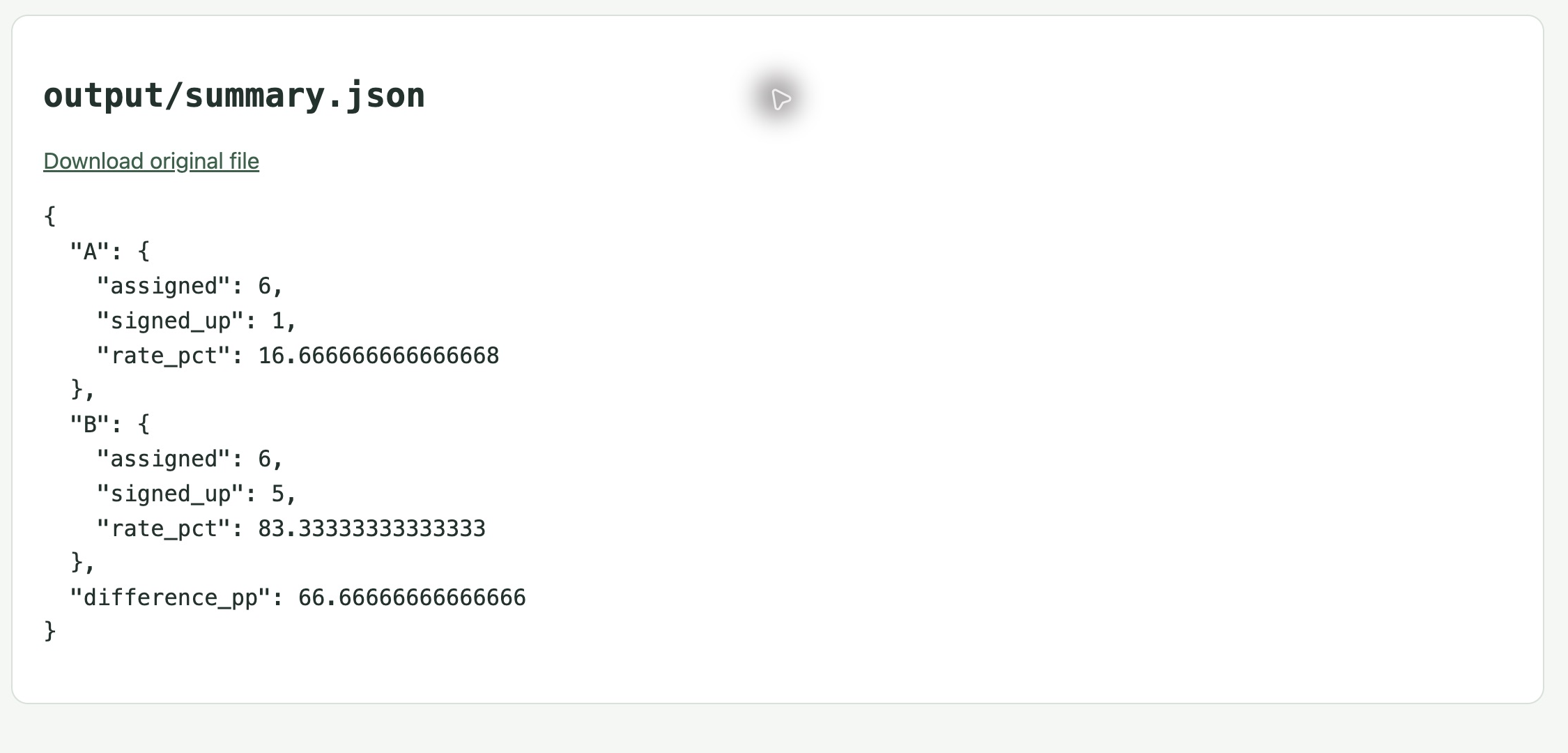
Results reads the saved summary.json: both groups contain six assigned people; A has one signup and B has five. The saved B-minus-A difference is about +66.67 percentage points.
For an ordinary editing error, read the traceback and correct the named line in the editor, save and rerun the affected stage. If you must restore the original outcomes scaffold, use the optional command below, then reapply only the classification region and save. It resets outcomes.py, while leaving the already completed comparison intact:
cp outcomes.before-window.bak outcomes.py
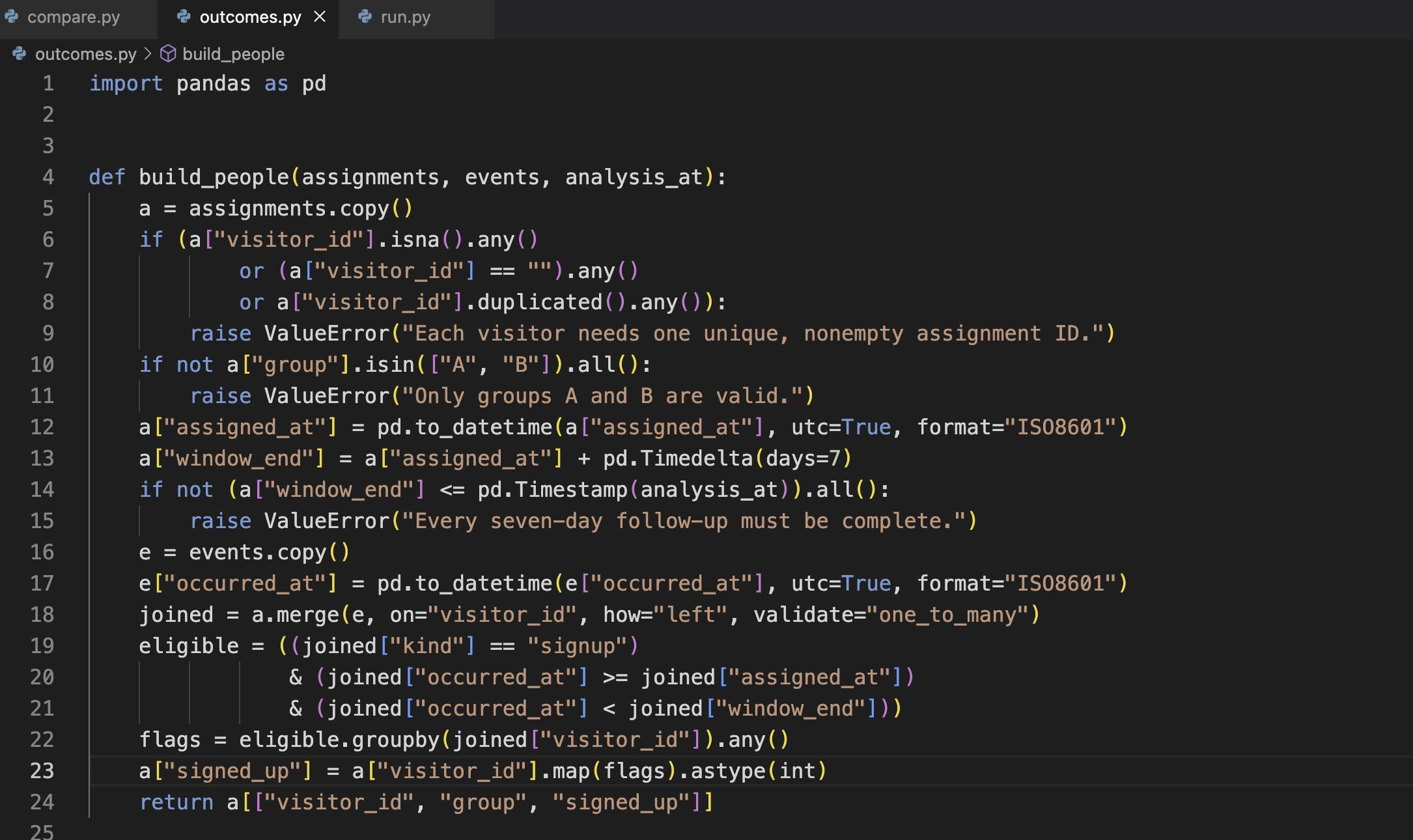
After restoring outcomes.py, reapply only the classification region and choose File > Save. This saved state keeps the original validation and returns one binary outcome per assigned visitor.
Do not rerun setup as an editing recovery: it deliberately refuses an existing workspace. The checks read live saved work and exercise unchanged functions only in disposable fixtures. They cover independent table orders, other IDs, no events and invalid allocation/follow-up. Equivalent pandas or Python implementations are accepted under the same DataFrame/object contract; repeated grading does not rebuild your live files.
You now have a defensible denominator and time window. The observed difference still does not establish that a page caused an improvement; the next units examine allocation variation and exact evidence.
Summary
You compared six visitor cards, wrote a reusable rate comparison and built complete seven-day outcomes from raw events. Stable IDs, an explicit UTC window and assigned-person denominators kept repeated clicks and absent events from distorting the result. Your saved person table and summary can now support an honest examination of random variation.