
Introduction
A working page sample is useful for browsing, but an editor needs every matching photo. Extend the same local API client to follow continuation tokens, preserve identity across pages and publish a CSV only after the complete batch and write succeed. Empty or short pages may still have more pages.
This independent unit prepares correct request/selection functions and an ordinary one-page writer. You need the earlier lab or equivalent HTTP/JSON/CSV knowledge. Use WebIDE for local edits and its integrated terminal, and Catalog for source previews, saved exports and public Demo controls. Edit only client.py and storage.py, using the standard library and helpers inside those files, with no extra helper modules/resources. Deliver ordinary CSV files, not symbolic links. Preserve catalog.py, /opt/commonlight, synthetic artwork and fictional records. Author-estimated reading/practice time: 55 minutes, not measured beginner timing.
Follow the Protocol Until It Ends
In this step, extend the working one-page client to collect every page, including empty and short pages, while keeping each ID once. This unit starts independently with correct request and selection functions; no earlier VM files are needed.
Open WebIDE, choose File → Open Folder..., and open /home/labex/project. Trust this prepared folder if prompted. After the file tree appears, choose the integrated Terminal → New Terminal and wait for its prompt. Use the same terminal throughout this unit. cd changes its working directory:
cd /home/labex/project
First run the existing normal page-sample path. The URL, category, orientation, size and output arguments have the same meaning as in the earlier lab; --first-page deliberately requests only a sample:
python3 catalog.py 'http://127.0.0.1:8080/api/harbor' street landscape 3 baseline.csv --first-page
Saved 2 photos to baseline.csv
Keep this sample. In Catalog → Your exports → baseline.csv, observe p01 and p02. It is correct for one page, but not the whole collection. Return to WebIDE. cat displays source files:
cat catalog.py
Without --first-page, the CLI calls client.collect before selecting and saving. Read the current implementation:
cat client.py
request_page already supports JSON, encoded cursor values and a three-second blocking-operation timeout. select_photos already applies both exact filters. Preserve those functions. The remaining limitation is the one-line collect, which returns the first page's items.
Separate records from continuation
A page size is a maximum, not a promise that each page has that many records. Predict this sequence: three records, then an empty page with another cursor, then one record with another cursor. Run this short read-only probe. The quoted here-document passes literal Python through its closing PY; it does not replace any source file:
python3 - <<'PY'
import client
url = 'http://127.0.0.1:8080/api/harbor'
first = client.request_page(url, 3)
second = client.request_page(url, 3, first['next_cursor'])
third = client.request_page(url, 3, second['next_cursor'])
print('Page 1 items:', len(first['items']))
print('Page 2 items:', len(second['items']))
print('Page 2 finished:', second['next_cursor'] is None)
print('Page 3 items:', len(third['items']))
print('Page 3 finished:', third['next_cursor'] is None)
PY
Page 1 items: 3
Page 2 items: 0
Page 2 finished: False
Page 3 items: 1
Page 3 finished: False
Only next_cursor is None establishes normal completion. Do not stop on an empty page, a short page or a guessed page count. Normal prepared catalogs are finite; retry and resume are outside this course.
The same photo_id may reappear with identical field values. Keep whole dictionaries under that ID. setdefault(key, value) inserts a record only when its ID is absent. A repeated title is not a duplicate ID: both different photos called Blue hour must remain. Conflicting revisions are outside this API's contract.
A set remembers unique values. set() starts it, cursor in seen_cursors checks membership and .add(cursor) remembers a new token. Check the legitimate null ending first, then reject a repeated token with raise ValueError. A protocol cycle is not a completed collection, even when its HTTP status is 200.
Edit only collect
In Explorer, open client.py and locate collect. Keep its def collect(endpoint, page_size): line, the imports and the two completed functions above it. Remove its obsolete one-page comment and replace only the function body with:
    photos = {}
    cursor = None
    seen_cursors = set()
    while True:
        page = request_page(endpoint, page_size, cursor)
        for photo in page['items']:
            photos.setdefault(photo['photo_id'], photo)
        cursor = page['next_cursor']
        if cursor is None:
            return list(photos.values())
        if cursor in seen_cursors:
            raise ValueError('Repeated cursor; catalog did not complete')
        seen_cursors.add(cursor)
The body starts with four spaces, the while body with eight, and its nested for/if bodies with twelve. The dictionary retains records across requests; list(photos.values()) returns them only at the explicit ending. A raised error prevents the CLI from reaching its save call.
Save with File → Save, Ctrl+S, or Cmd+S on macOS. File → Auto Save may already save; confirm the tab has no unsaved dot. For a syntax error, read the named line, correct only that local edit or use Edit → Undo, save and retry. Do not replace already correct request/filter functions or reset the VM.
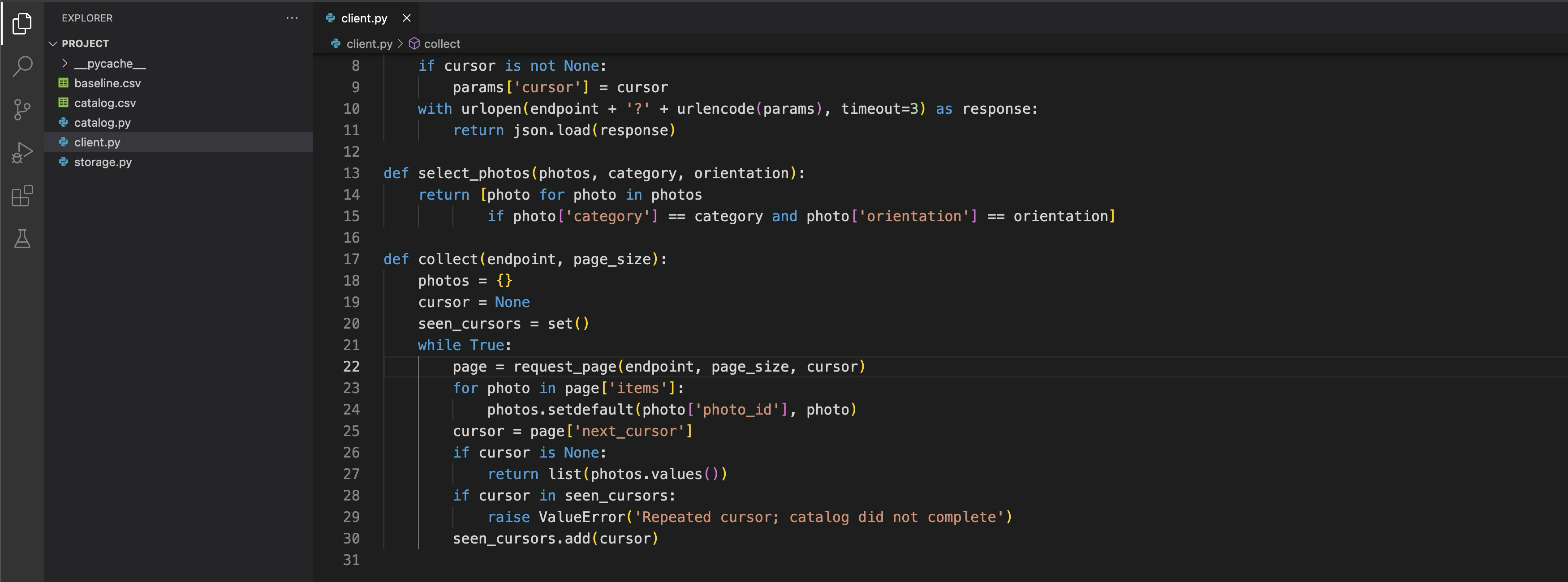
The saved collect body keeps one record per photo_id, returns only when next_cursor is None and rejects a repeated cursor. The request function is only partly visible above it; the client.py tab has no unsaved dot.
Run the complete collection without the sample flag:
python3 catalog.py 'http://127.0.0.1:8080/api/harbor' street landscape 3 catalog.csv
Saved 5 photos to catalog.csv
Inspect actual identities and titles with the CSV reader rather than trusting the count:
python3 - <<'PY'
import csv
with open('catalog.csv', encoding='utf-8', newline='') as stream:
    for photo in csv.DictReader(stream):
        print(photo['photo_id'], '|', photo['title'])
PY
p01 | Morning, market
p02 | Blue hour
p04 | The "quiet" lane
p08 | Blue hour
p09 | Last tram — 帰り道
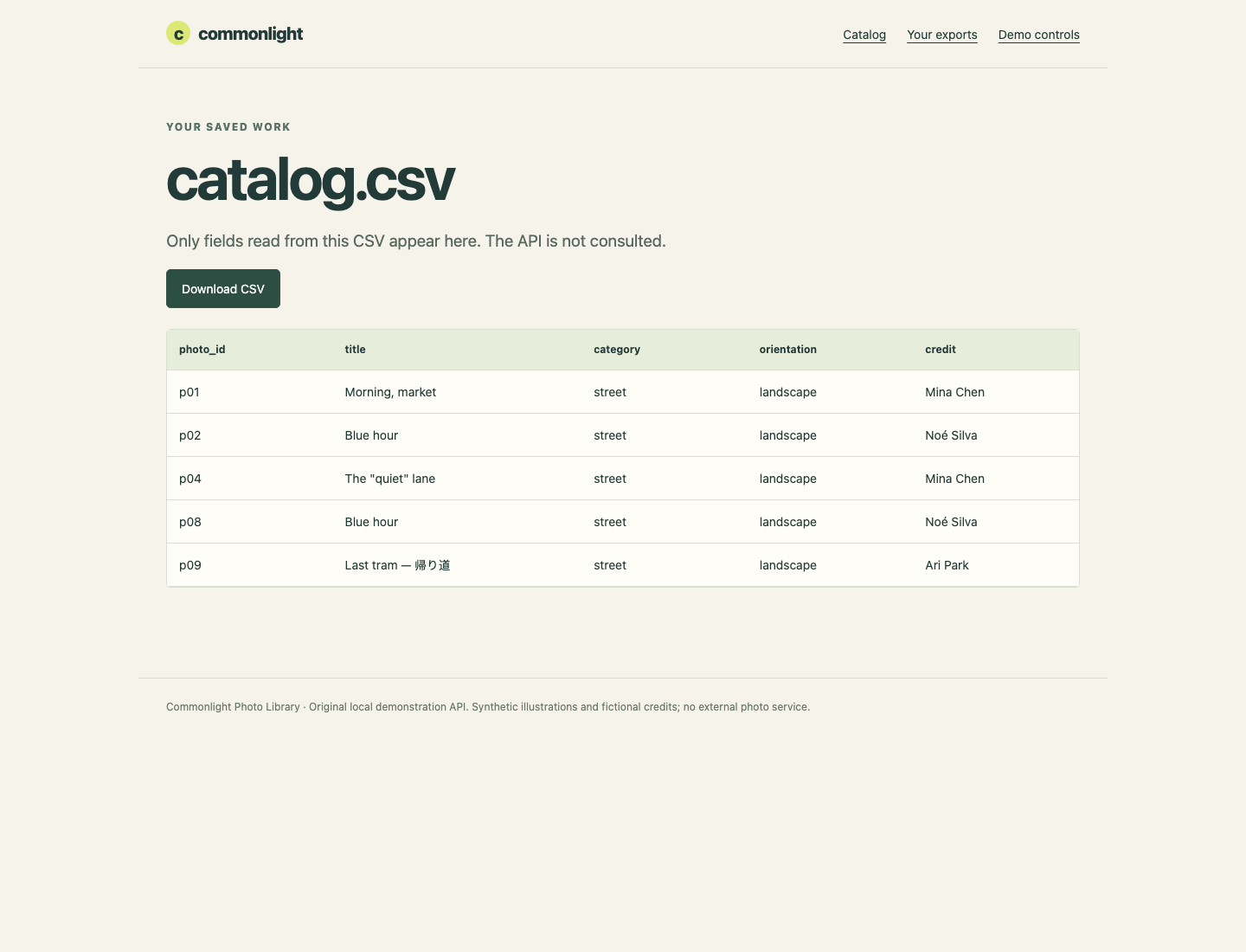
p02 occurs once, p08 keeps the same title under another ID, and the final-page p09 is present. In Catalog → Your exports → catalog.csv, read those same values. The viewer only reads this CSV; an incomplete file remains incomplete there. Return to WebIDE for the self-check. Keep baseline.csv, the new result and prepared sources. For a wrong filename, use pwd, ls and the earlier cd, then correct the path.
Publish Only a Complete Export
In this step, protect the last complete export when a later request, cursor cycle or file write fails. Continue in WebIDE with the same integrated terminal. Your collector already finishes before saving. The writer needs its own complete-success boundary too.
Move the write boundary
Open storage.py in Explorer and read save_csv. Opening the final path with w can truncate a good file before a later write succeeds. Keep its CSV field names and mapping; change where and when the write becomes the published result.
Use this order: allocate a unique temporary file beside the destination, write the complete CSV, close it, then replace the destination. Path(output) provides .parent (the directory) and .name (the filename). Keeping the temporary in that directory puts replacement on the same filesystem.
NamedTemporaryFile allocates a new name. It does not borrow catalog.csv.tmp, which might be somebody's saved work. delete=False keeps the temporary after it closes; stream.name identifies the one file you own. A successful POSIX replace publishes the finished file atomically. This is not a promise of power-loss durability or coordination between concurrent writers.
The finally cleanup runs after success or error. It removes only your allocated temporary if it still exists. After successful replacement that path is already gone. An exception still reaches the CLI and produces an error; cleanup must not turn failure into an empty success.
Keep import csv and FIELDS unchanged. Add these imports alongside csv:
import tempfile
from pathlib import Path
Keep the existing def save_csv(output, photos): signature. Replace its old direct-write body with the following body. The CSV mapping/header/rows calls are the same, now inside the temporary-file context:
    output = Path(output)
    temporary = None
    try:
        with tempfile.NamedTemporaryFile(
            mode='w', encoding='utf-8', newline='',
            dir=output.parent, prefix='.' + output.name + '.',
            suffix='.tmp', delete=False
        ) as stream:
            temporary = Path(stream.name)
            writer = csv.DictWriter(stream, fieldnames=FIELDS)
            writer.writeheader()
            writer.writerows(photos)
        temporary.replace(output)
    finally:
        if temporary is not None and temporary.exists():
            temporary.unlink()
The replace has eight spaces and is outside the with block, after the stream closes. Cleanup's unlink() has twelve spaces under its if. Check this ordering, save and confirm the tab's saved state before running. Correct a named syntax/indentation line locally; preserve your completed collector and previous CSVs.

The saved writer closes the temporary-file stream before replacing the destination. Its finally block removes only the temporary file allocated by this call; the CSV field mapping remains in place and the storage.py tab has no unsaved dot.
Run a normal complete batch before introducing faults. sha256sum prints a content fingerprint and filename; keep its output visible for comparison:
python3 catalog.py 'http://127.0.0.1:8080/api/harbor' street landscape 3 catalog.csv
sha256sum catalog.csv
Observe refusal without losing good work
Switch to the Catalog platform tab. Choose the website's Demo controls link, then Enable middle-page failure. Confirm Middle-page failure ON while repeated cursor remains OFF.
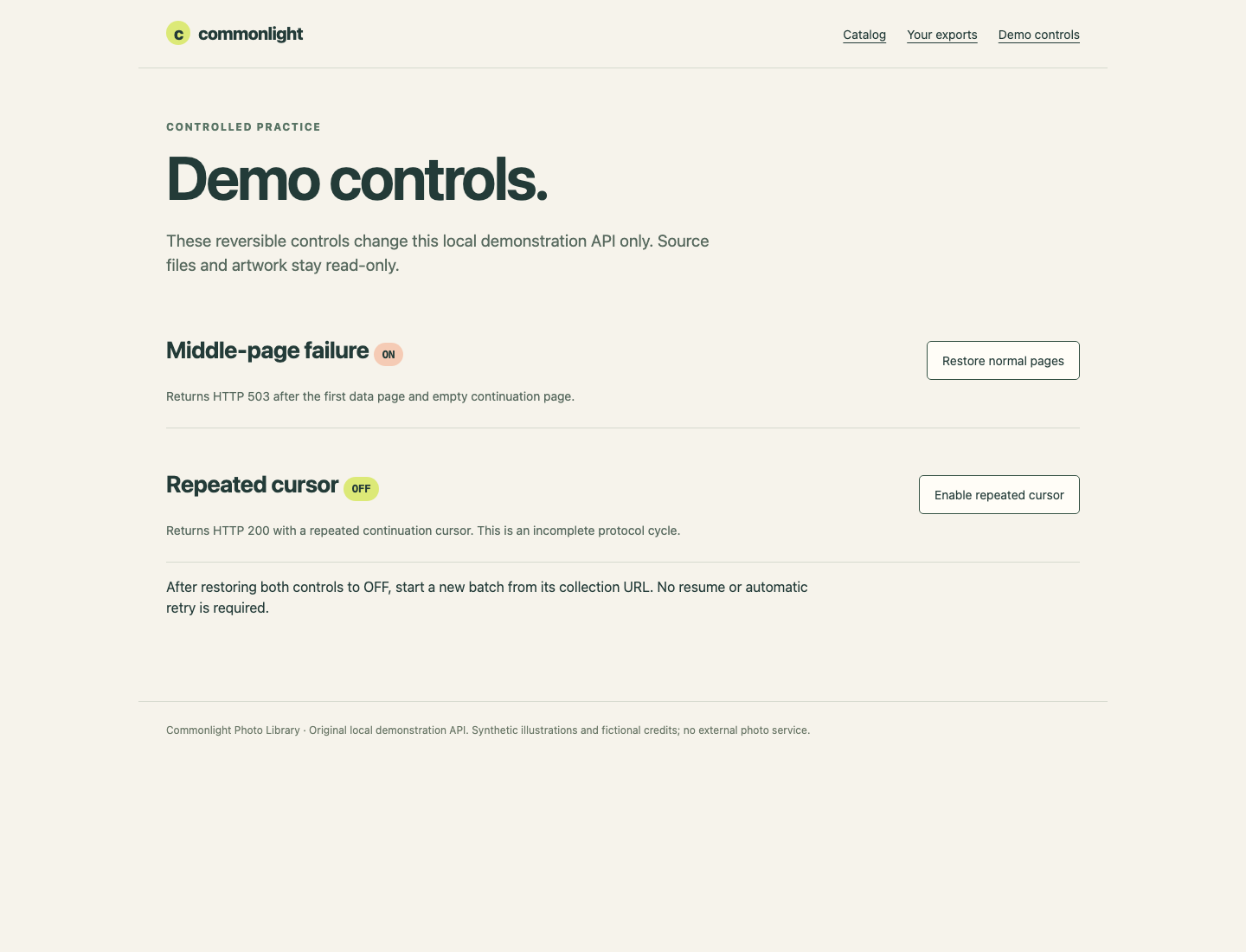
The control changes only this demonstration API's memory, not its protected files. Return to WebIDE and its existing terminal. The next command intentionally fails. $? is its exit status; read it immediately with printf, before another command changes it:
python3 catalog.py 'http://127.0.0.1:8080/api/harbor' street landscape 3 catalog.csv
printf 'Exit status: %s\n' "$?"
sha256sum catalog.csv
HTTP request refused: 503. No complete export published.
Exit status: 1
...
HTTP 503 means a middle-page request was refused. It is neither a connection failure nor a successful empty selection. The fingerprint must match the previous value, and Catalog → Your exports → catalog.csv must still show the old five-record export. A nonzero exit is not enough if a program damaged that file. Its mode, owner and mtime must also remain unchanged; the self-check tests those properties and unrelated neighbors in isolated fixtures.
In Catalog → Demo controls, choose Restore normal pages in the middle-page failure card and confirm OFF. Return to WebIDE, start a new batch from the collection URL and confirm normal success; do not reuse an earlier cursor:
python3 catalog.py 'http://127.0.0.1:8080/api/harbor' street landscape 3 catalog.csv
Next use Catalog → Demo controls → Enable repeated cursor. Confirm Repeated cursor ON and middle-page failure OFF. Return to WebIDE:
python3 catalog.py 'http://127.0.0.1:8080/api/harbor' street landscape 3 catalog.csv
printf 'Exit status: %s\n' "$?"
Export failed: Repeated cursor; catalog did not complete
Exit status: 1
These requests have HTTP 200, but their repeated token is a protocol error. Your guard prevents both an endless loop and incomplete publication. The earlier complete export must remain usable.
In Catalog → Demo controls, choose Restore normal pages inside the Repeated cursor card. Confirm both controls are now OFF. Return to WebIDE and run a new complete batch, then a legal zero-match selection into another file:
python3 catalog.py 'http://127.0.0.1:8080/api/harbor' street landscape 3 catalog.csv
python3 catalog.py 'http://127.0.0.1:8080/api/harbor' missing landscape 2 empty.csv
Saved 5 photos to catalog.csv
Saved 0 photos to empty.csv
In Catalog → Your exports, open empty.csv: five headers and no records is correct. Then open catalog.csv and choose Download CSV. Open the downloaded file and compare its exact metadata with the table. The reader transmits stored bytes; it does not repair output by querying the API.
Return to WebIDE for the self-check. It runs unchanged copies of your program against real isolated HTTP fixtures, changed URLs/selections/sizes and a child-only file-write failure. Your live resource limits and files are not altered. Preserve your program, samples and complete export; remove no neighbor to make a check pass.
Summary
You followed opaque continuation tokens to the explicit null ending, kept distinct identities despite duplicate titles, and rejected a protocol cycle. You published a completed UTF-8 CSV through a unique temporary file and preserved the previous good result after failures. The same program can accept another supplied collection and selection.