
Introduction
An editor at Commonlight already has a working first-page preview. Turn it into a reusable, filtered photo-catalog sample. You will run the prepared program, read the functions it calls, then locally edit its request parameters and selection rule. The CSV writer is prepared and readable; you use it without rewriting it. The next guided lab adds full traversal and safe publication.
Commonlight is an original local demonstration API. Its records and credits are fictional, and its pictures are synthetic illustrations, not documentary photographs or an external service. You need Python functions, collections, loops, exceptions and basic file output. HTTP, URLs, JSON and CSV are introduced here. Use WebIDE for files and its integrated terminal, and Catalog for the website. Edit client.py here; read the prepared storage.py. Keep catalog.py and /opt/commonlight unchanged. Use the standard library and functions inside those two learner modules, with no extra helper modules/resources. Author-estimated reading/practice time: 40 minutes, not measured beginner timing.
Run the Preview and Extend Its Request
In this step, run the working preview, read its call chain, then make its request honor a supplied page size and continuation token. Its initial limits are deliberate: it always requests the first three records and keeps all of them, even when filter arguments are supplied. This is a useful preview, not yet the requested street-landscape selection.
Open the prepared project
Open WebIDE. Choose File → Open Folder..., enter /home/labex/project, and open that folder. Trust this prepared folder if prompted. Only after its file tree appears, choose the integrated Terminal → New Terminal and wait for the shell prompt. This terminal belongs to the same environment as the files. A new terminal has its own working directory; cd changes it:
cd /home/labex/project
Switch to the Catalog platform tab. Harbor walks shows Morning, market, Blue hour and Window light. Match the IDs beneath the artwork. These three cards preview one page, not the whole collection. You export metadata rather than downloading pictures.

Return to WebIDE and its existing integrated terminal. HTTP is the request/response protocol used by this local API. The URL http://127.0.0.1:8080/api/harbor identifies its address: 127.0.0.1 is this environment, 8080 is the service port and /api/harbor selects a collection. Use this URL in the terminal; Catalog uses the platform's browser address for the same service.
The prepared catalog.py takes five positional arguments: collection URL, category, orientation, maximum page size and output filename. python3 runs the file. Quotes keep the URL together as one shell argument. --first-page explicitly requests a page sample rather than a complete collection. The initial preview does not apply the filter arguments or requested size yet. Run it to see that limit:
python3 catalog.py 'http://127.0.0.1:8080/api/harbor' street landscape 3 page.csv --first-page
Saved 3 photos to page.csv
page.csv is a real five-column UTF-8 file. It includes p03, a home portrait, as well as the two street landscapes. This is an unfinished draft of the requested selection. cat prints a file:
cat page.csv
The columns are photo_id, title, category, orientation and credit. CSV means comma-separated values. Its writer quotes a comma inside a title so it remains one field. In Catalog, choose the website's Your exports link, then page.csv. Observe all three rows. This table reads your saved file; it does not fill in records from the source. Return with the page's Catalog link, then switch back to WebIDE.
Find the boundary to change
Read the prepared command interface:
cat catalog.py
Find the args.first_page branch: it takes items from client.request_page. Then it calls client.select_photos and storage.save_csv. Those functions, not the CLI, are where this project changes. Open client.py in Explorer and read its three functions. You can also print them:
cat client.py
request_page already makes a real request and decodes JSON. JSON is structured text: this page becomes a dictionary with an items list and a next_cursor. Each item is a record dictionary. JSON null becomes Python None; a non-null cursor means another page exists. A photo ID identifies a record; its title is only a display label and can be shared.
The existing with closes the HTTP response. timeout=3 limits blocking operations such as connecting or waiting on a socket; it is not a deadline for every possible complete job. The CSV implementation is also ready to read:
cat storage.py
Keep that writer unchanged here. It uses csv.DictWriter for named columns, UTF-8 for text and newline='' so the CSV module manages line endings. Safe publication of a previous complete export belongs to the next unit. The full source contract is readable too:
cat /opt/commonlight/api-contract.md
The request signature accepts page_size and optional cursor, but the body uses a fixed 3 and never adds a cursor. Confirm that actual limit. The following short here-document passes literal Python to python3 until the closing PY; include that line. import client loads your current file. Comparing the items lists asks whether the supposed continuation repeated the first page:
python3 - <<'PY'
import client
url = 'http://127.0.0.1:8080/api/harbor'
first = client.request_page(url, 2)
second = client.request_page(url, 2, first['next_cursor'])
print('Requested maximum: 2')
print('Returned records:', len(first['items']))
print('Continuation repeated first page:', second['items'] == first['items'])
PY
Requested maximum: 2
Returned records: 3
Continuation repeated first page: True
These are client limitations, not evidence that the API ignores its contract.
Edit the request locally
In the client.py editor, keep the imports, function signatures, select_photos and collect. Inside request_page, remove its obsolete fixed-preview comment and replace only params = {'page_size': 3} with:
    params = {'page_size': page_size}
    if cursor is not None:
        params['cursor'] = cursor
The function body has four spaces; the assignment inside if has eight. None means the first request omits the cursor parameter. Otherwise copy exactly the returned token. A cursor is opaque: never interpret its characters or guess a page number. urlencode(params) already encodes the dictionary as a query string, including +, / and = in tokens. Keep endpoint and page size unchanged during a traversal. Leave the existing with urlopen(...) and return json.load(response) below your edit.
Save with File → Save, Ctrl+S, or Cmd+S on macOS. A tab dot means unsaved changes. File → Auto Save may already have saved your edit; you need not turn it off. Confirm the saved state before running. If Python names a line with a syntax or indentation error, correct that local edit or use Edit → Undo, save and retry. Preserve the other functions and CSV; do not reset the VM.
Now use your corrected request:
python3 - <<'PY'
import client
url = 'http://127.0.0.1:8080/api/harbor'
first = client.request_page(url, 2)
second = client.request_page(url, 2, first['next_cursor'])
third = client.request_page(url, 2, second['next_cursor'])
print('First-page records:', len(first['items']))
print('Second-page records:', len(second['items']))
print('Second page finished:', second['next_cursor'] is None)
print('Third-page records:', len(third['items']))
PY
First-page records: 2
Second-page records: 0
Second page finished: False
Third-page records: 1
The requested size works, and the token reaches a different page. An empty page may still have a continuation. This unit prepares requests; the next one implements full traversal.
The request self-check verifies the already supplied real-HTTP/JSON capability against another local URL. The original fixed-three preview can pass it too: it is a regression check, not proof that every size and cursor works. The real probes above demonstrate those new behaviors. Keep the three-row page.csv draft for the next step. For a wrong path, use pwd to display the directory, ls to list files, then the earlier cd and correct filename.
Select Matching Records and Read the CSV
In this step, select the first page's street landscapes, reuse the prepared writer and inspect exact stored fields. Begin in WebIDE with the same integrated terminal. The three-row page.csv is unfinished; the goal is the correct selection, not a count alone.
Change only the selection rule
Open client.py in Explorer and locate select_photos. return list(photos) copies every record and ignores both filter arguments. Predict which record must be excluded: p03 is a home portrait. Keep your completed request and one-page collect. Remove the obsolete preview comment and replace only that return statement with:
    return [photo for photo in photos
            if photo['category'] == category and photo['orientation'] == orientation]
This list comprehension visits each photo; if keeps it only when and joins two true comparisons. Both comparisons are exact and case-sensitive. Keep whole record dictionaries so IDs, titles and credits stay related. Do not select a fixed pair of IDs or filter by display title. No matches is a valid empty list. Save and confirm no unsaved tab dot remains.
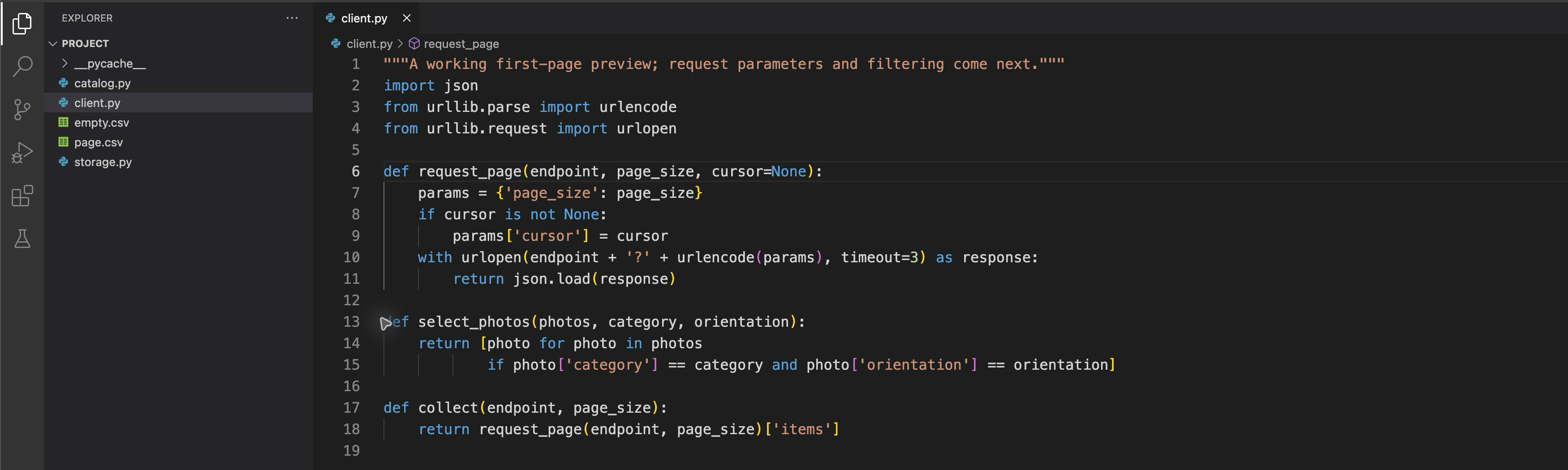
This final editor view shows the saved request and selection functions. The selection keeps a record only when both category and orientation match; the client.py tab has no unsaved dot.
In the prepared storage.py, FIELDS names each column once. DictWriter maps values to those columns; writeheader() writes the header and writerows(photos) writes selected records. newline='' lets the CSV module handle line endings, and UTF-8 preserves accented and non-Latin text. Do not replace it with comma-joining strings, which breaks Morning, market. This ordinary w sample writer replaces the draft when rerun; it does not yet promise safe publication after a failed write.
Replace the unfinished sample with the correct selection:
python3 catalog.py 'http://127.0.0.1:8080/api/harbor' street landscape 3 page.csv --first-page
Saved 2 photos to page.csv
Read the actual saved file with DictReader, which reconstructs quoted fields:
python3 - <<'PY'
import csv
with open('page.csv', encoding='utf-8', newline='') as stream:
    for photo in csv.DictReader(stream):
        print(photo['photo_id'], '|', photo['title'], '|', photo['credit'])
PY
p01 | Morning, market | Mina Chen
p02 | Blue hour | Noé Silva
Both exact relationships remain; p03 fails the filter. Your functions also accept another valid selection rather than copying these examples.
Distinguish refusal from an empty selection
The API accepts page sizes 1–5. The next command intentionally requests 9 and must fail with HTTP 400. $? is the immediately preceding command's exit status; printf shows it before another command replaces it. Run the commands separately:
python3 catalog.py 'http://127.0.0.1:8080/api/harbor' street landscape 9 rejected.csv --first-page
printf 'Exit status: %s\n' "$?"
HTTP request refused: 400. No complete export published.
Exit status: 1
HTTPError represents this refusal; a connection failure is reported separately as Connection failed. Neither is a successful zero-match result. This request fails before saving, so it must not create rejected.csv or change the earlier page.csv. Recover with an allowed size; do not change the service or reset the VM:
python3 catalog.py 'http://127.0.0.1:8080/api/harbor' street landscape 3 page.csv --first-page
A legal filter with no matches succeeds. Use a separate filename:
python3 catalog.py 'http://127.0.0.1:8080/api/harbor' missing landscape 2 empty.csv --first-page
Saved 0 photos to empty.csv
It has the five-column header and no records: a successful result, not an error disguised as a file.
Switch to Catalog, choose the website's Your exports link, and open page.csv. Check both exact records, including the comma and accented credit. Open empty.csv to see its header-only result. Return to page.csv, choose Download CSV, and open the downloaded file as text or in a CSV reader. It contains saved bytes; the viewer does not query the source to repair a file. Use the page's Catalog navigation to return, then switch back to WebIDE for the self-check. The non-null continuation still means this is a page sample, not a complete catalog.

The actual 137-byte download opened in a local table preview. It contains the two matching first-page records, preserving the comma in Morning, market and the accented credit Noé Silva.
Summary
You started with a working unfiltered preview, read its request/selection/writing call chain and locally extended the request and selection rules. Your real UTF-8 CSV keeps exact metadata and correct quoting. HTTP refusal, connection failure and a valid empty selection remain distinct. The next unit follows all continuation tokens and publishes complete exports safely.